Friday, 29 May 2015

Customer web history will  be kept on file for one year

The Conservative Party can now implement policies, unpopular with civil rights groups, such as the Draft Communications Data Bill, previously rejected by the coalition.  The Bill will force internet service providers and mobile networks to retain customer data for at least 12 months.  This would include records on browsing activity, social media, email, voice calls, internet gaming and messaging services.



Following the Queens speech on 27th May 2015 the Investigatory Powers Bill  will be as follows;

“New legislation will modernise the law on communications data.” The purpose of this legislation is to:

• Provide the police and intelligence agencies with the tools to keep you and your family safe.

• Address ongoing capability gaps that are severely degrading the ability of law enforcement and intelligence agencies ability to combat terrorism and other serious crime.

• Maintain the ability of our intelligence agencies and law enforcement to target the on-line communications of terrorists, paedophiles and other serious criminals.

• Modernise our law in these areas and ensure it is fit for purpose.

• Provide for appropriate oversight and safeguard arrangements. The main benefits of these clauses would be:

• Better equipping law enforcement and intelligence agencies to meet their key operational requirements, and addressing the gap in these agencies’ ability to build intelligence and evidence where subjects of interest, suspects and vulnerable people have communicated on-line.

• Maintain the ability of our intelligence agencies to target the on-line communications of terrorists, and other relevant capabilities.

• Provide for appropriate oversight arrangements and safeguards.

• This will respond to issues raised in the independent review by the Independent Reviewer of Counter-Terrorism legislation, which is due to be published shortly. The main elements of the clauses are:

• The legislation covers all investigatory powers including communications data, where the Government has long maintained that the gap in capabilities are putting lives at risk. 27 May 2015 


• The legislation will enable the continuation of the targeting of terrorist communications and other capabilities. 

Friday, 22 May 2015

THE SPY IN YOUR HAND

You might not realise it but your iPhone has been watching and recording exactly where you've been and how long you spent there.  Are you where you should be!!


It's weird, fascinating and just a little bit scary to realise that your iPhone contains a perfect record of where you've been in the last month or so.  That includes the exact time you arrived and left anywhere;  your office, a bar, the shopping centre, even the beach!!

Apple say the data is collected "in order to learn places that are significant to you" and improve traffic routing services.  The company says the data is stored locally on your iPhone and will not be accessed elsewhere or shared with anyone else.

Now if you would rather use your memory and photos to record where you've been, here's how to switch off this spy;


 In System Services scroll all the way down to the bottom, press 'Frequent Locations' and look at the 'History' section.  Click on one of the area names to see where you've been - you may be surprised!

Tuesday, 12 May 2015

Watch out for those Tattoos says Apple

Apple has warned customers with tattoos around their wrists, they may experience performance issues when using its newly released Watch due to the ink blocking its sensors.

The manufacturer has received a number of complaints surrounding the heart rate sensor on the device, since it went on sale in April.

Apple confirmed in a statement there are numerous factors which can affect the Watch's ability to detect a heart beat, including temperature, motion and changes to skin colour - such as tattoos.

The heart rate sensor on the smart watch uses technology known as 'photoplethysmography' to detect the amount of blood flowing through a users wrist by reflecting light off the skin.  Apple said;  "Permanent or temporary changes to your skin, such as some tattoos, can also impact heart rate sensor performance.  "The ink, pattern, and saturation of some tattoos can block light from the sensor, making it difficult to get reliable readings".

Monday, 27 April 2015

Back to the Future: our favourite smartphones, past & present


The Huffington Post recently published their list of the 10 Best Smartphones currently available. It’s not a hugely surprising list, but it makes for interesting reading:

  • 1.       Apple iPhone 6/6Plus
  • 2.       Samsung Galaxy S6 Edge
  • 3.       HTC One M9
  • 4.       Sony Xperia z3
  • 5.       Huawei P8
  • 6.       Google Nexus 6
  • 7.       LG G3
  • 8.       Motorola Moto X2
  • 9.       Samsung Galaxy Note 4
  • 10.   Nokia Lumia 930


It is obviously the iPhone 6 and the Galaxy S6 which have had the most press, but the HTC and the Huawei in particular are stand out phones which show promise for the future of the companies. It is worth noting that there is only one Windows phone on the list, but we fully expect that to change over the next five years, with the upcoming introduction of the multi-platform Windows 10.

Reading this list, though, got us all thinking about our favourite phones that we’ve had over the years. There were some favourites that we all had in common, and many of them are on the list of the all-time bestselling mobiles:

  • 1.       20. Nokia 2650, 2004, 35 million units
  • 2.       Apple iPhone 3GS, 2009, 35+ million units
  • 3.       Samsung Galaxy SII, 2011, ~40 million units
  • 4.       Samsung Galaxy SIII, 2012, ~40 million units
  • 5.       Nokia 6230, 2004, 50 million units
  • 6.       Nokia 3100, 2003, 50+ million units
  • 7.       Motorola StarTAC, 1996, 60 million units
  • 8.       Motorola C200, 2003, ~60 million units
  • 9.       Apple iPhone 4S, 2011, 60+ million units
  • 10.   Nokia 5130, 2007, 65 million units
  • 11.   Nokia 6010, 2004, 75 million units
  • 12.   Nokia 1208, 2007, 100 million units
  • 13.   Nokia 1600, 2006, 130 million units
  • 14.   Motorola RAZR V3, 2004, 130+ million units
  • 15.   Nokia 2600, 2004, 135 million units
  • 16.   Nokia 3310, 2000, 136 million units
  • 17.   Nokia 5230, 2010, 150 million units
  • 18.   Nokia 1200, 2007, ~150 million units
  • 19.   Nokia 3210, 1999, 160 million units
  • 20.   Nokia 1110, 2005, 250 million units


Both the Motorola RAZR and the Nokia 3210 appeared on our favourites list – especially for those in the office in their mid-thirties! But there’s a few of us who definitely had a soft spot for the Sony Ericsson T610, and the W200i. The T610 was one of the first mobiles to have a quality in-built camera; even if it was just 0.1MP. And the W200i featured the Walkman tie-in, allowing users to play MP3, AMR, MIDI, and WAV files (amongst others).


The one thing that we all remembered, was playing Snake. Either on our own Nokia 3210 (remember the battery life on that thing?!), or borrowed from a friend. So imagine the elation when the Fivebars office discovered that you can download the Snake ’97 app for both Android and iOS.


We pride ourselves on providing the best mobile phone deals for our business customers, but there is a little pang of regret that we can’t sell you one of our favourite late 90s, or early 2000s phones.

Tuesday, 21 April 2015

Go Go Gadget…


With EE’s offer of a free-but-for-the-price-of-a-text-message Power Bar for every customer, we thought we’d take a look at some of the other useful gadgets for business mobile users – because running out of battery half-way through a day of out-of-office meetings is no longer your biggest problem.


“The overhead storage compartments are full…”

One of the advantages of some of the Android phones over iPhones has always been the ability to use a microSD for extra storage space, but a number of Androids seem to be doing away with this feature.


So what do you do when you love a particular phone, but know you’ll need more storage? Use a flash drive!

If it’s so simple you’re probably wondering why more people don’t do it. Some phones have the drivers already installed (I tried plugging a flash drive into my S4 Mini, but it did not immediately recognise it), but many phones will require that you do something called ‘rooting’ where you download an app which will allow your operating system to recognise the drive. There are a number of apps that you can use, and it will depend on your phone and your OS as to which one you choose. However, you may want to check your warranty, as rooting your phone can invalidate it.

“The pilot will be dimming the lights…”

Many people have to travel for business, which means that their phones become portable offices whilst they are away from their desk. Now, you’ve added the extra storage capacity, which means that you can carry your flash drive full of music with you at all times, but you don’t want to be that kid at the back of the bus.


If you like to listen to music to help you sleep whilst travelling – or even when you’re at home – then there are a couple of options available. You can get pillows which have mini speakers inside; either plug your phone in via the headphone socket, or connect by Bluetooth. Or use something like SleepPhones. These look like soft headbands that are much more comfortable than earbuds or headphones when you’re sleeping. They, like the pillows, can be used with or without wires, and would be ideal for plane or train journeys.

“Please ensure that your seat backs and tray tables are in their upright, and locked position…”


There are times when using your phone is not always appropriate or possible, in which case you may want something to keep you occupied – especially if you rely on your Kindle app for reading. We would recommend the Belkin LEGO Builder Case (available for iPhone 5/5S) – ideal for the nervous flyer!


We'd love to hear what your favourite mobile gadgets are, so leave a comment below. And if you want the best mobile deal for your business, get in touch with us at Fivebars Mobile.

Wednesday, 15 April 2015

Work Smarter, Not Harder: Five Best Apps for Improving Productivity


You’ll see from the title of today’s blog, that the intention was to write about the best apps for improving your productivity.

Unfortunately, not everything went to plan…

We picked an office guinea pig to try each of these apps out, and whilst things started off well, it would be incorrect to suggest that productivity for today was increased for all.

Streamlining your phone

The first apps we played with were Opera Max, and CleanMaster, both available for free on iOS and Android.

Opera Max is designed to manage your data. It compresses videos, images, and other media to save your mobile data usage, and to speed up mobile browsing. It also self-pauses when your WiFi is turned on. It’s relatively useful if you regularly find yourself paying for data at the end of the month, but if you have a good mobile phone plan, like those on offer here at Fivebars Mobile, you probably have more than enough data already.

CleanMaster installs a ‘1 Tap Boost’ button onto your home screen, so that you can perform regular ‘sweeps’ of junk that slows down your phone’s performance. Our guinea pig for this app says:

“I decided to really test this out, so before installing it, I trawled through my phone, deleting every cache, every extraneous file. Once installed CM managed to clear another 1.3GB of ‘junk’ – I’m sold!”

Self-motivation

An app that was recommended to us recently was Carrot – which bills itself as a to-do list with a personality. Sadly it is only currently available on iOS, but is fairly priced at £2.29.


The idea behind Carrot is that she already doesn't like you. If you tick off the tasks in your to-do list, you can appease your mini-robot master, but if you fail, Carrot Will Not Be Happy. It’s definitely fun, but whether you get more done than “Task one: write to-do list. Task two: check off task one” just to raise your level, remains to be seen.

Social media

As anybody who uses social media for their business knows, you can easily spend hours on Facebook and Twitter trying to reach everyone. This is where apps like Fenix, and IF come in handy.

Fenix is reasonably priced at £3.69, on Android, and is one of the most consistently well-reviewed third-party Twitter clients available. It allows you to customise how you view your Twitter account, and lets you manage multiple accounts. Our guinea pig would definitely recommend this for people who find themselves tweeting a lot throughout the day.

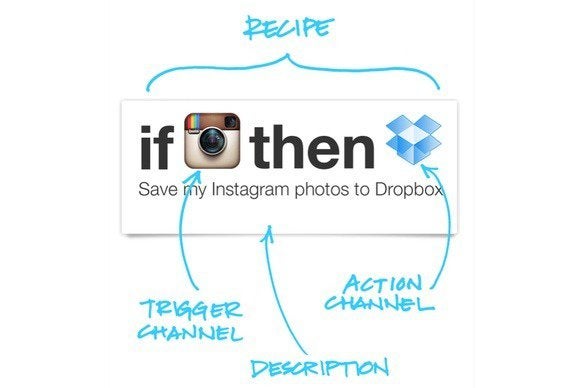
This brings us to IF. Also known as IFTTT – if this then that.


We’d love to give you a review of this amazing connecting app, but despite having installed it nearly three hours ago, our guinea pig is still playing with it…


The basic premise is that it allows you to connect different apps, by adding ‘recipes.’ These recipes do things like automatically making your latest Instagram photo your screen pic, or sending you an email reminder if you miss a call from your mum. Or, hopefully, switching your employee’s phone off if they miss more than three meetings in a row…

Wednesday, 8 April 2015

Facebook Apps for Business Users


With a Facebook presence now almost mandatory for businesses, trying to create a legitimate presence without getting lost in the crowd can be difficult. One way to ensure that you are ahead of the competition is to keep on top of the newest ways to use Facebook apps.

Facebook Pages

This is possibly the most useful of the Facebook apps for business users. It allows you to manage multiple accounts and pages, check notifications, schedule and post updates, and keep an eye on some of the more basic ‘Insights.’ It will also send you a gentle reminder if you haven’t updated in a while.

Ideal for those who have multiple pages to manage, whilst on the move.

Facebook’s official Pages app is available free on Android and iOS. If you’re a Blackberry user you might try the SlateIt Dashboard App (also free), and Windows users can download the FB Pages Manager app.

Facebook Groups

Many small business owners are members of lots of different Facebook groups, interacting with other business owners, creatives, and customers. The Facebook Groups app – free on Android and iOS – works much like the Facebook Pages app, allowing you to better manage your interaction with multiple groups.

Messenger apps

In addition to Shout! for Messenger, and Stickered for Messenger, you can now get Selfied for Messenger and Strobe for Messenger. All of these are designed for personal accounts rather than business users, but there is no reason why you can’t experiment with ways to make them work for you – especially if your target market uses these sorts of apps themselves.

Shout! allows you to turn photos into a sort of mini-powerpoint, by overlaying words one by one on the picture.


Stickered does exactly what it says on the tin, allowing you to customise photos with a number of stickers and effects.

Selfied lets you take pictures to replace smilies. This might work really well for businesses who have a recognisable staff – pick your notoriously grumpy employee, and use their selfie in place of a ‘feeling bummed’ or your perkiest for a ‘feeling motivated’.

Strobe is a GIF-making app. Again, worth playing with for certain businesses, the four-frame GIFs could allow you to send product previews to selected clients.


Riff

Facebook’s latest toe in the water of video content. Rumoured to have been designed out of the popularity of last summer’s Ice Bucket Challenge, which saw videos leap to one billion watches per day on Facebook, Riff is perhaps less about trying to market a successful app, and more about trying to gather data on video creation, and who engages with Facebook in this way.


Similar to Snapchat’s Our Story feature, Riff allows you to take video clips of up to 20 seconds, then forward them to friends to add to or ‘riff’ on. Another potentially fun app for some teams – try letting your employees make promo videos this way.


If you are looking for the best mobile phone deal for your business, get in touch with us at Fivebars Mobile.